

Hyvä Checkout for Magento 2: Features, Benefits & 2026 Updates
Table of Contents
- Introduction
- Importance of an Optimized Checkout Process
- Understanding Checkout Challenges
- Hyvä Checkout
- Benefits of Using Hyvä Checkout
- Does Hyvä Checkout Support Adobe Commerce and B2B?
- What's New in Hyvä Checkout in 2026?
- How to Implement Hyvä Checkout
- How to Configure Hyvä Checkout?
-
Hyvä Checkout: Quick Answers
- What is Hyvä Checkout?
- Is Hyvä Checkout included with the Hyvä Theme?
- Does Hyvä Checkout work with Magento 2?
- Does Hyvä Checkout work with Adobe Commerce?
- Does Hyvä Checkout support B2B?
- Does Hyvä Checkout support one-page checkout?
- Is Hyvä Checkout faster than the default Magento checkout?
- Does Hyvä Checkout improve conversion rates?
- What payment methods work with Hyvä Checkout?
- Can Hyvä Checkout be customized?
- Is Hyvä Checkout Right for Your Magento Store?
Introduction
Checkout is one of the most important parts of a Magento 2 store because it is where a shopper completes the purchase. Long forms, unnecessary steps, limited payment options, checkout errors, and poor mobile usability can create friction at the point where the customer is ready to buy.
Hyvä Checkout is a commercial checkout solution for Magento Open Source and Adobe Commerce. It is built around the Hyvä frontend stack and Magewire, with configurable checkout layouts, components, payment integrations, and options for custom development. Hyvä Checkout is available as a standalone product and can also be used with the broader Hyvä product ecosystem.
This article explains what Hyvä Checkout offers, how its checkout layouts work, where it fits within Magento 2 and Adobe Commerce stores, and what merchants should consider before implementing it in 2026.
Importance of an Optimized Checkout Process
A checkout should make it easy for customers to complete an order without unnecessary steps or uncertainty.
Common checkout problems include:
- Too many form fields
- Unclear shipping costs or delivery options
- Limited payment methods
- Complicated account creation
- Poor mobile usability
- Validation errors
- Slow page responses
- Payment or checkout failures
These issues matter because the customer has already completed much of the product discovery and buying decision before reaching checkout. Friction at this stage can prevent an otherwise qualified shopper from completing an order.
For Magento merchants, checkout optimization is also more complicated than changing the frontend layout. The checkout needs to work with payment methods, shipping configuration, tax rules, customer accounts, third-party extensions, analytics, and custom business logic.
Hyvä Checkout addresses several of these areas through configurable layouts, checkout components, mobile options, and an ecosystem of payment and shipping integrations. However, installing a new checkout does not guarantee a specific conversion improvement. Results depend on the store's configuration, customer behaviour, payment options, performance, and overall buying experience.
Understanding Checkout Challenges
Checkout abandonment can happen for many reasons, and not all of them can be solved by changing the checkout technology.
Unexpected costs, complicated forms, limited payment options, account requirements, technical errors, and poor mobile experiences can all create friction during checkout.
For Magento stores, there is another consideration. The checkout often depends on several connected systems and extensions. Payment gateways, shipping providers, tax services, customer attributes, discounts, fraud prevention, analytics, and custom business rules all need to work together.
This means checkout optimization is not simply about reducing the number of steps.
The goal is to make the required steps clear, easy to complete, and reliable while continuing to support the store's commercial and operational requirements.
Hyvä Checkout
Hyvä Checkout is a commercial checkout solution for Magento Open Source and Adobe Commerce. It uses Magewire and the Hyvä frontend approach to provide a checkout that Magento developers can configure and extend using familiar Magento concepts.
The checkout supports configurable layouts, checkout steps, components, payment integrations, and custom functionality. Merchants can use different checkout configurations for different store views or business requirements.
Hyvä Checkout is also available as a standalone product. The current Hyvä product offering includes a Hyvä Theme license with the checkout, and Hyvä states that Checkout can work through theme fallback on stores that are not already using a Hyvä frontend.
For merchants considering a migration, the important question is not simply whether Hyvä Checkout is faster than the default Magento checkout. The more important question is whether its architecture, integrations, supported features, and customization options fit the store's requirements.
Learn more about Hyvä Checkout.
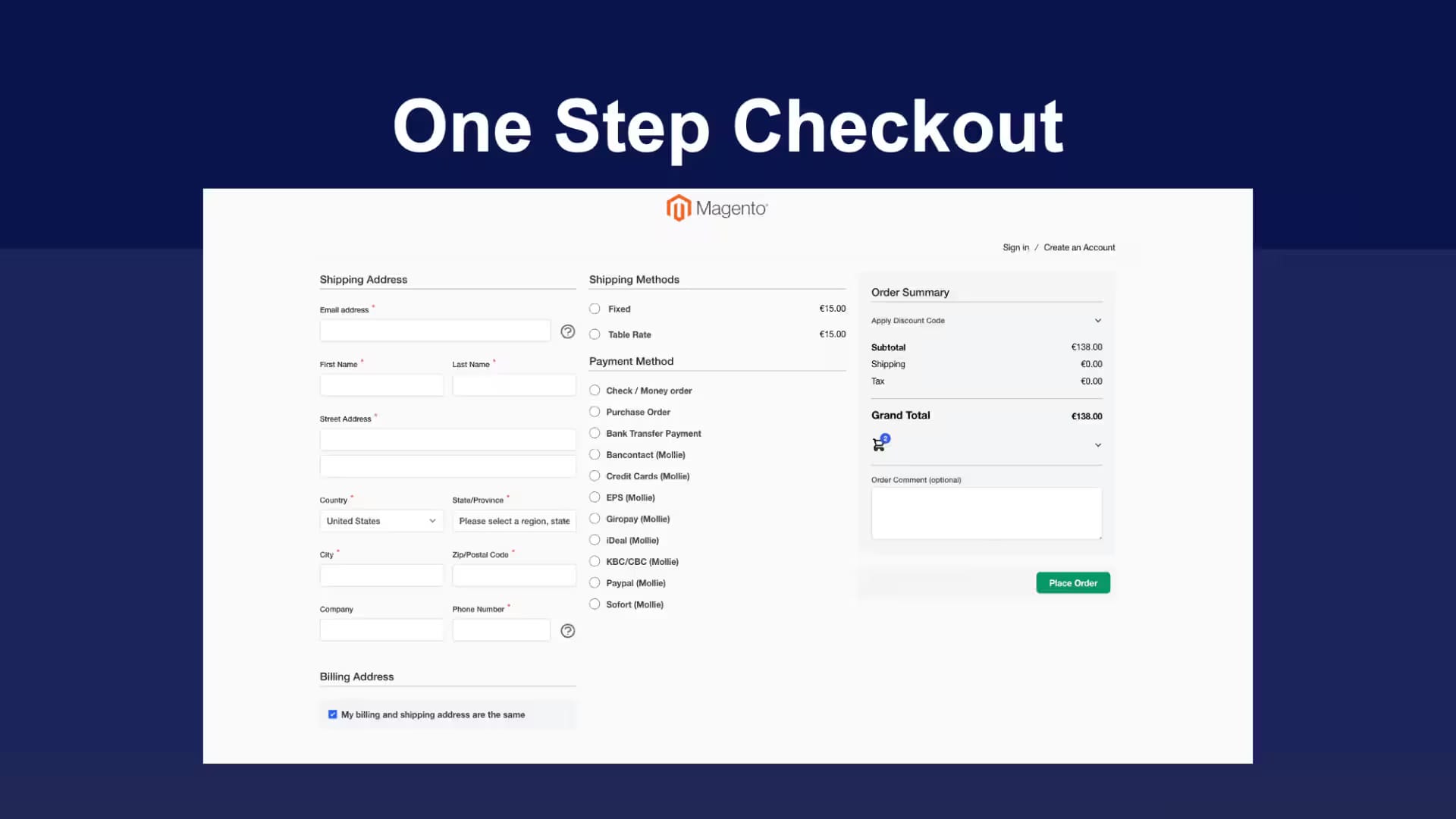
Hyvä Checkout Includes
Hyvä Checkout provides several capabilities that can be configured around the needs of a Magento store.
One-Page Checkout
A one-page layout keeps the main checkout information within a single checkout view. This can reduce navigation between separate checkout pages and gives customers a clear view of the information they need to complete the purchase.
Two-Step or Multi-Step Checkout
A multi-step checkout separates checkout information into individual stages. This can be useful when a store needs to collect more information or when separating shipping, payment, and order review makes the process easier to understand.
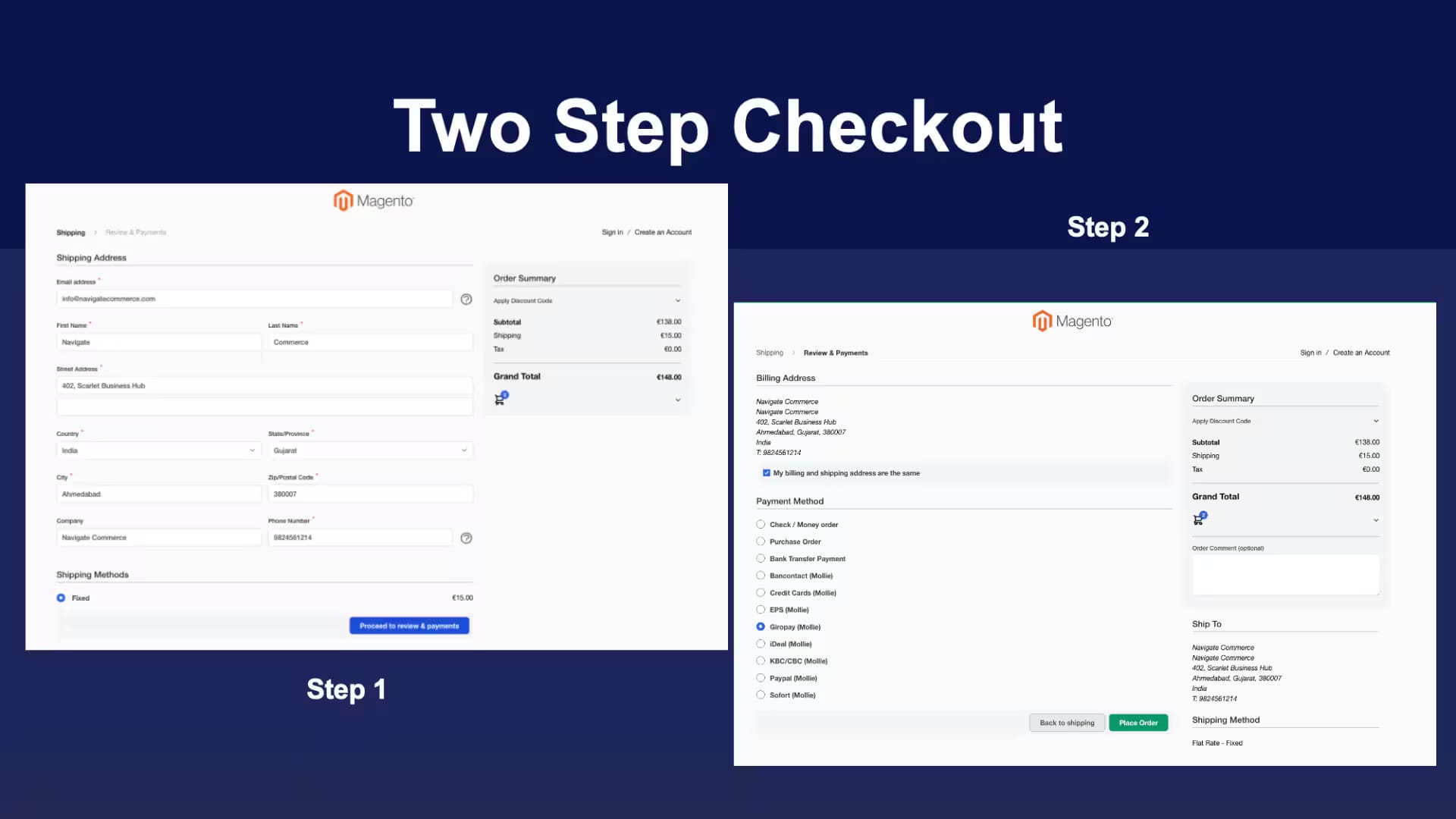
Hyvä Checkout also allows developers to create custom checkout configurations, including different step sequences and layouts. Multiple checkout configurations can be used for different websites, store views, or business requirements.
Mobile Checkout Configuration
Hyvä Checkout can use a separate mobile checkout configuration when mobile checkout is enabled in the Magento Admin. This allows merchants to present a different checkout structure to mobile visitors when that makes sense for the store.
Custom Checkout Components
Developers can add, remove, rearrange, and conditionally display checkout components using Hyvä Checkout's configuration and Magento layout system.
The hyva_checkout.xml configuration file controls checkout variants, steps, and step visibility, while layout XML controls the components displayed within those steps.
Payment and Shipping Integrations
Hyvä Checkout has a growing ecosystem of payment and shipping integrations. Supported payment integrations include services such as Adobe Payments, Adyen, Airwallex, Authorize.Net, and Braintree, among others. Merchants should verify compatibility for their specific payment and shipping extensions before implementation.
View the current Hyvä Checkout payment integrations.
Benefits of Using Hyvä Checkout
Hyvä Checkout provides several benefits for Magento merchants and development teams, particularly when a store requires a configurable checkout and greater control over checkout functionality.
A Checkout Built for Magento Developers
Hyvä Checkout uses Magewire and Magento's backend architecture, including PHP, dependency injection, layout XML, and related Magento development patterns. This gives Magento developers a familiar environment for extending checkout functionality.
Flexible Checkout Layouts
Merchants can choose between different checkout layouts and create custom configurations when the default layout does not match their requirements.
This is useful for stores that need different checkout flows for specific customer groups, store views, product types, or business processes.
Mobile-Focused Configuration
A separate mobile checkout configuration can be enabled when a store needs a different checkout experience for mobile visitors. This provides more control than simply using the same layout across every device.
Performance Considerations
Hyvä positions Checkout as a performance-focused alternative to the standard Magento checkout and currently reports a 13-times-faster mobile load-time comparison against the standard Magento checkout. This is a Hyvä-reported comparison, not a universal performance guarantee. Actual results depend on hosting, extensions, payment integrations, customizations, and the rest of the store architecture.
Easier Checkout Customization
Hyvä Checkout's configuration and component architecture allow developers to create checkout variants and modify individual parts of the checkout without rebuilding the entire checkout from scratch.
For example, hyva_checkout.xml can define checkout variants, control the order and visibility of steps, and support conditional checkout behaviour.
Payment Integration Options
Hyvä Checkout has dedicated integrations for a range of payment providers. Because standard Magento integrations do not automatically work with Hyvä Checkout in every case, merchants should check the current integration tracker and compatibility documentation before migrating.
Does Hyvä Checkout Support Adobe Commerce and B2B?
Hyvä Checkout can be used with Adobe Commerce, but Adobe Commerce merchants should evaluate feature compatibility before implementation.
This is particularly important for stores using:
- Company Accounts
- Customer-specific pricing
- Purchase Orders
- Negotiable Quotes
- Company Credit
- Store Credit
- Gift Cards
- Custom customer or address attributes
- Adobe Commerce-specific extensions
Hyvä's Adobe Commerce compatibility is provided through Hyvä Enterprise, and its 2026 updates include support for Adobe Commerce B2B 1.5 features. Hyvä's Q1 2026 product update specifically highlights compatibility improvements for B2B 1.5, including Negotiable Quote Templates, Drafts, and Duplication, along with Company Management updates.
Hyvä also maintains a compatibility matrix and roadmap for Adobe Commerce and B2B functionality. Merchants should review the current status of the specific features and integrations they use before starting a checkout migration.
Review the current Hyvä roadmap and compatibility information.
What's New in Hyvä Checkout in 2026?
Hyvä Checkout has continued to receive product and infrastructure updates in 2026. Several of these changes are relevant to merchants planning a new implementation or maintaining an existing checkout.
Tailwind CSS v4 Support
Hyvä Checkout received full Tailwind CSS v4 support in 2026, aligning the checkout with the wider Hyvä frontend ecosystem.
For merchants and development teams using the latest Hyvä frontend stack, this reduces the need to maintain different styling approaches across the storefront and checkout.
Payments API Backport
Hyvä released a Payments API Backport Module that allows merchants running older supported versions of Hyvä Checkout to access newer payment integration capabilities and security improvements without immediately completing a full checkout upgrade.
This can be useful for stores where payment integrations need to be updated but a complete Magento or Hyvä upgrade requires more planning.
Magewire and Checkout Development
Magewire remains an important part of the Hyvä Checkout architecture. Hyvä's current documentation describes the Evaluation API as a PHP-driven system used to validate and process checkout data on the server and return structured instructions to the frontend.
Hyvä is also continuing development around Magewire and checkout architecture as part of its product roadmap.
B2B and Adobe Commerce Compatibility
Hyvä Enterprise's 2026 updates include compatibility with Adobe Commerce B2B 1.5, including Negotiable Quote Templates, Drafts, Duplication, and Company Management improvements.
For Adobe Commerce merchants, this is important because B2B checkout requirements can involve company hierarchies, approval processes, customer-specific pricing, purchase orders, and negotiated quotes.
Security Updates
Hyvä released a security update in July 2026 addressing a high-severity issue related to payment method availability checks. The fix was included in Hyvä Checkout 1.3.12 and backported to supported earlier versions.
This is a useful reminder for merchants running Hyvä Checkout: checkout and payment components should be included in the store's regular update and security maintenance process.
How to Implement Hyvä Checkout
Implementing Hyvä Checkout involves more than installing the checkout package. Before development begins, merchants should review the existing Magento checkout, payment methods, shipping providers, customer account requirements, third-party extensions, and custom checkout logic.
A typical implementation includes the following steps.
1. Review the Existing Checkout
Identify the custom functionality currently used in the Magento checkout.
This should include:
- Payment methods
- Shipping methods
- Tax configuration
- Customer attributes
- Discounts
- Promotions
- Third-party extensions
- Analytics and tracking
- Custom checkout fields
- Custom validation
- ERP or other system integrations
2. Check Extension Compatibility
Not every standard Magento checkout extension works with Hyvä Checkout without additional compatibility work.
Payment, shipping, tax, fraud-prevention, analytics, and other checkout-related integrations should be checked before development begins. Hyvä maintains documentation and an integration tracker for supported integrations.
3. Install Hyvä Checkout
Hyvä provides Composer-based installation and configuration instructions through its official documentation. The exact installation process can change between releases, so developers should use the current Hyvä documentation rather than relying on old installation commands from third-party articles.
View the current Hyvä Checkout installation documentation.
4. Configure the Checkout
After installation, merchants can select the active Hyvä Checkout configuration from the Magento Admin and configure the available checkout options.
5. Customize the Checkout
Custom checkout requirements can be implemented through Hyvä Checkout's configuration and Magento layout system.
The hyva_checkout.xml file can define checkout variants, steps, layouts, inheritance, and conditions. Layout XML can then control the components displayed within those steps.
6. Test the Complete Purchase Journey
Testing should cover:
- Guest checkout
- Logged-in customers
- Mobile devices
- Payment methods
- Shipping methods
- Coupons and discounts
- Tax calculations
- Customer-specific pricing
- Order placement
- Confirmation emails
- Analytics
- Third-party integrations
7. Deploy and Monitor
After launch, monitor checkout errors, payment failures, order completion, mobile behaviour, and conversion performance.
A checkout migration should be evaluated using actual store data rather than assuming that a new checkout will automatically improve conversion rates.
How to Configure Hyvä Checkout?
Hyvä Checkout configuration is managed through Magento Admin under the Hyvä Themes checkout settings. The current documentation explains how merchants can select the active checkout configuration and enable an optional mobile checkout configuration.
For more advanced requirements, developers can create custom checkout configurations using hyva_checkout.xml.
The configuration file can be used to:
- Create checkout variants
- Define checkout steps
- Change step order
- Control step visibility
- Apply conditions
- Create parent and child checkout configurations
- Configure different checkout experiences for different store views
Hyvä Checkout merges configuration files from active modules and themes to determine the final checkout structure.
For component-level changes, Magento layout XML is used to add, remove, move, or conditionally display checkout components.
Because configuration requirements differ between Magento installations, development teams should follow the current Hyvä documentation for the installed version instead of copying configuration commands from older articles.
Read the Hyvä Checkout configuration documentation.
Hyvä Checkout: Quick Answers
What is Hyvä Checkout?
Hyvä Checkout is a commercial checkout solution for Magento Open Source and Adobe Commerce. It uses Magewire and the Hyvä frontend architecture to provide configurable checkout layouts, components, and integrations.
Is Hyvä Checkout included with the Hyvä Theme?
Hyvä Checkout is a separate commercial product. The current Hyvä Checkout offering includes a Hyvä Theme license, and Hyvä also supports using Checkout through theme fallback on stores that do not already use a Hyvä frontend.
Does Hyvä Checkout work with Magento 2?
Yes. Hyvä Checkout is designed for Magento Open Source and Adobe Commerce installations. Merchants should check the current system requirements and compatibility information before installation.
Does Hyvä Checkout work with Adobe Commerce?
Yes, but Adobe Commerce merchants should check the compatibility of their specific Adobe Commerce and B2B requirements. Hyvä Enterprise provides additional Adobe Commerce compatibility, including B2B functionality.
Does Hyvä Checkout support B2B?
Hyvä's Adobe Commerce compatibility includes B2B functionality through Hyvä Enterprise. Current 2026 updates include support for Adobe Commerce B2B 1.5 functionality such as Negotiable Quote Templates, Drafts, Duplication, and Company Management improvements.
Does Hyvä Checkout support one-page checkout?
Yes. Hyvä Checkout supports configurable checkout layouts, including one-page and multi-step checkout configurations. Custom checkout configurations can also be created using hyva_checkout.xml.
Is Hyvä Checkout faster than the default Magento checkout?
Hyvä reports a 13-times-faster mobile load-time comparison against the standard Magento checkout. Actual performance depends on the store's hosting, extensions, payment integrations, configuration, and customizations.
Does Hyvä Checkout improve conversion rates?
Hyvä Checkout is designed to reduce checkout friction, but there is no universal conversion-rate improvement that applies to every store. Conversion results depend on factors such as checkout configuration, payment methods, customer behaviour, pricing, shipping, performance, and the overall store experience.
What payment methods work with Hyvä Checkout?
Hyvä Checkout has dedicated integrations for a range of payment providers, including Adobe Payments, Adyen, Airwallex, Authorize.Net, and Braintree. The available integrations change over time, so merchants should check the current Hyvä payment integration documentation before implementation.
Can Hyvä Checkout be customized?
Yes. Developers can create custom checkout configurations and modify checkout components using Hyvä Checkout configuration, Magento layout XML, and related development tools.
Is Hyvä Checkout Right for Your Magento Store?
Hyvä Checkout can be a good fit for Magento stores that need a configurable checkout and want greater control over checkout performance, layouts, components, and integrations.
Before making the switch, merchants should assess the existing checkout, identify custom functionality, check extension compatibility, review Adobe Commerce or B2B requirements, and test the complete purchase journey.
The right implementation depends on the store's technical architecture and business requirements. A checkout migration should therefore be treated as a Magento development project rather than simply replacing one frontend with another.
Navigate Commerce helps Magento and Adobe Commerce merchants with Hyvä Checkout implementation, customization, integrations, migration, and checkout optimization.
Contact our team to discuss your Magento or Adobe Commerce checkout requirements.